

This plugin allows to create a vignette on the source clip. Both rectangular and elliptical vignettes are supported. Vignettes can be repositioned and rotated, applied in any color and blending mode available, to the inside or to the outside. Alternatively only the mask can be rendered, replacing the source layer altogether or the vignette can be filled with transparency.
Premiere Pro version supports 8 and 32 bits (Maximum Bit Depth). In After Effects only 8 and 16 bit depth is supported so far.
Alternativamente, puede haber un medicamento viagra generico. Este medicamento alivia a los hombres de la disfunción eréctil.
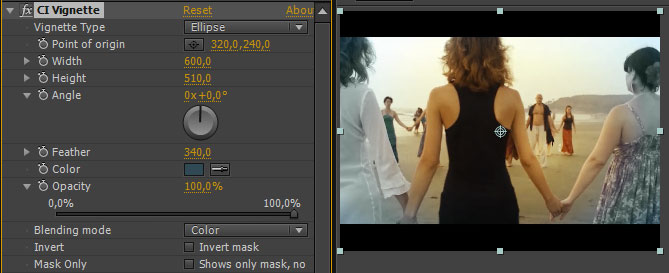
Vignette interface.
Supported software
- Adobe After Effects CS5, CS5.5, CS6, CC
- Adobe Premiere Pro CS5, CS5.5, CS6, CC
Supported OS
- Windows 7 64-bit, Windows 8
- Mac OS X 10.6.x, 10.7.x, 10.8.x
Installation
The plugin comes without an installer. Please unpack the downloaded file and copy it to Adobe’s Media Core folder, so that both applications will see them.
The folder can be found on Windows here:
C:\Program Files\Adobe\Common\Plug-ins\CS6\MediaCore
and on OS X here:
MacHD/Library/Application Support/Adobe/Common/Plug-ins/CS6/MediaCore
Substitute CS6 for your current version or 7.0 for Creative Cloud. If you have multiple versions installed, simply copy the plugin to each of the folders.
The plugin will show up as “CI Vignette” under “Creative Impatience” group of effects.
If you keep getting error messages on Windows platform, or the plugin fails to show up, you might need to install Microsoft Visual C++ 2010 Redistributable package, available from the Microsoft website: http://www.microsoft.com/en-us/download/details.aspx?id=14632.
Download link
Download the plugin here.
How to use it?
The plugin is mostly self-explanatory, and works similarly to the “Circle” effect, but in case you need detailed instructions and tutorials, look here.
Known issues
- In Premiere Pro CS5 and CS5.5 when paused resolution is lower than full, and the effect is not selected, the vignette might not display properly, although it will render fine, and will show correctly during playback.
- If you are experiencing crashes with this plugin in Adobe Premiere Pro, especially with footage larger than HD, turn on the “Maximum Render Quality” checkbox in sequence settings. For some reason it fixes the problem.
- Feather handles will behave a bit erratically if the vignette is heavily rotated.
- On OS X with certain anamorphic footage types GUI will not display correctly, although you can still manipulate it and use the rendered layer as a guide. I have no idea what is causing this problem.
- The effect might not work properly with layers smaller than sequence size in Premiere Pro.
Road map
Below are the proposed features that could be added to this plugin in the future. If you are interested in further development, please donate. Feel free to propose additional features in the comments. The change log is also available.
v1.4
- 32-bit and smart rendering in After Effects
- Use layer values instead of color values
- Separate saturation control
Thanks. As someone from the still world, I was astounded what a task a simple vignette can be. It seems insane that a vignette is not standard in Premier.
This is working well and really makes clips shine. I found the common problem that I’ve seen in vignette tutorials where it simply darkens without contrast giving a faded look. I was able to maintain contrast using the Linear Burn blend mode from the effect and dialing back the opacity. Well done.
Pingback: Premiere pro plugins « Gianni Russo Blog
I used the feathered crop tool on all my clips in a music video, meticulously matching the crop boundaries frame by frame for a few hours to help lend the look of a projection to the video, and after i exported my sequence all of the clips i used this plugin on were completely and utterly messed up. I had to go back and delete the effect from almost 100 clips. do a test render to make sure it works on your system or else you might end up getting what you pay for.
Your comment would be more helpful to everyone if you posted it under Feathered Crop plugin and provided some data about your system. Cheers.
The problem has been fixed. You can download the latest version from the downloads page.
Pingback: Recortes, Viñetas y Ventanas | Videologic Sistemas
Great plug in but when I went to export my video the vignetted scenes come out with a line through the centre with the color of the vignette blocked out on the right…?
Hi Alex. It would be great if you provided more info – sequence and export settings, and footage type. Ideally you could also email me a screenshot of the problem. All the contact information can be found in the “about me” tab.
Pingback: Gratis: Creative Impatience Plugins Para After Effects | Alfredo Cifredo, Jr.
To sad, its not working on my computer. I put the plugins into the Adobe/Common/Plug-ins/CS6/MediaCore .. but even with a restart of Premiere Pro 6 its not appearing in the effects. Thanks for clarifying.
I assume you’re on OS X, but which version? Do you have After Effects installed? If so, are you getting any error messages when opening it? And I assume you unzipped the file?
Pingback: Free Anamorphic After Effects Plugin | VashiVisuals Blog
I’m using Mac OSX 10.8.5. Installing the plugin using the above message crashed premiere. There is no file in position to remove, to stop premiere from crashing every time I open it. What is the process to uninstall?
You have to delete the file from the MediaCore directory, where you copied it first.
Pingback: Vignette | Music production, mix, editing, plug...
The app won’t show up In the App Store and I really want to use it?? What should I do?
It’s not an app. It’s a plugin. Download it from the download page and follow the install instructions on this webpage.
Would it be possible to add choice of blurring the vignetted area instead of coloring. So that one could use it as blur vignette making edges softer?
Hi Jasketti. Thank you for your support. Yes, it’s a common request, I have it on my list but I’ve been pretty swamped with work.
Not getting the plug ins to show up in the applications. I have them in the mediacore folder but no plug ins to select in the program?
Make sure you have the proper path. /Library/Application Support/Adobe/Common/Plug-ins/7.0/MediaCore – it’s the library in the root of your system drive, not ~/Library.
I have them in my SC6/MediaCore/no folder just the plug-ins
My other plug-ins I have in the same MediaCore are working fine?
Make sure you downloaded the CS6 version. Other than that, I have no idea.
I´m sad. My new computer use windows 8.1
I copy the plugin into C:\Program Files\Adobe\Common\Plug-ins\CS6\MediaCore and restart premiere cs6, incluse I restart windows, but I don´t see the plugin in premiere. Some idea?.
Finally I see the carpet “Creative Impatience” but inside the carpet “Video effects”. All Ok. Thanks for share this plugins.
hey man thanx is there anyway to make plugin to erase the background completely like the way you would in Photoshop with the background eraser tool/pen tool/magnetic lasso tool and just add a a motion tracked line around the video image plz emil me if know anything like it
Yes, there’s a great plugin, and it’s called After Effects 🙂 Try using Rotobrush there.
Hi Bart,
Awesome effects man, thanks so much for sharing your knowledge, just realized I can’t find any of the effects on the newest update from CC14.1, they worked fine on CC and CS6, but now they’re gone, ……… the root folder doesnt exist anymore?
Keep up the good work 🙂
I’m definitely seeing them here. Make sure they are in the Common/7.0/MediaCore folder.
Pingback: Is this your next NLE? Premiere Pro CC Round Up | Jonny Elwyn - Film Editor
Pingback: Replicating The Anamorphic Look in After Effects | 4K Shooters
Hello. I try to install de plug in, but It seem to not wok correctly.
I have de Microsoft Visual C++ 2010 Redistributable package installed on my computer.
The file is copying to the correct folder but there is no creative impatience folder in the video effect.
I try to reinstall de Microsoft visual but It’s the same.
I try on a other computer always the same.
I work on Win pro 64 withe premiere pro CS6.
Thanks for your help.
Philippe
Which version of Windows? Maybe the folder is not correct if it’s the same on other machines.
Hi Bartlomiej!
i am doing your tutorials from fxphd, in the lesson 5 i have problems compiling the code ( i have mac) and this happend:
auto ClipSum8 = [](const A_u_char in, const PF_FpLong modF) {
return static_cast(MAX(0, MIN(modF + in, PF_MAX_CHAN8)));
};
Xcode say: Expected expression.
i need your help, i can not found your email!
Please send me a private message via fxphd forum. You have access to it, right?
hey Bart – I’m running the latest Premiere 2017 on Windows 10 – can’t get your vignette to work – should it or not? Cheers J
It definitely works fine here on Win 10, Premiere CC 2017, so I don’t see why it shouldn’t work on your machine. Make sure you copy it to the proper folder. That tends to be the case.
Thanks a lot. At first the Creative Impatience folder do not show up , I try to re-install the Microsoft Visual C++ 2010SP Redistributable package and it ask me to fix the previous installation. After on restart the premiere and the Folder show up. Thank you very much.
Hi Bart. I wanted to download the CI Vignette but the download page is no longer. Is it possible to send it to me?
Try here: http://www.creativeimpatience.com/download-2/
Nice! Thanks Bart!
Since updating to Catalina, every time I reboot and launch Premiere, I get a message asking to move Vignette to the trash because its from an unknown developer. IT repeats 3 or 4 times even though I allow it in the security panel of sys prefs. After I hit cancel enough times it works. This only happens when I reboot computer. There is no version listed with the plug in
Hi Rick. Unfortunately, this is not something that I will address anytime in the foreseeable future. I have since switched careers and I am no longer supporting the plugins. Thank you for being their user and sincere apologies for leaving you like this. The required effort goes beyond my current capabilities.