What’s coming in Premiere CS7?

Update: see how right or wrong I was with what is actually coming in the next release.

In their recent video concering the introduction of Adobe Anywhere – which I will elaborate on more in another note – guys from Adobe revealed a few interesting upcoming (or at least being tested) features in Adobe Premiere.

Both presenters were using custom development build of Adobe Premiere (the same that you can see at Al Mooney’s presentation at IBC 2012). Especially take a look at around 2:35, where the transition is being applied. For your convenience I include a cropped screenshot with the timeline panel, where all the interesting stuff is happening.
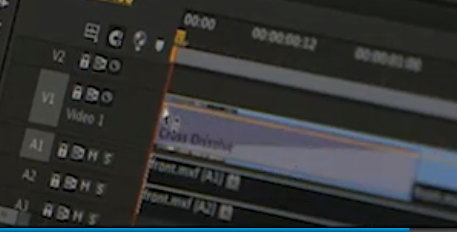
Take a look at mute and solo switches for audio tracks, much wider transition bar centered on the clip, and an interesting button to the left of snapping, most likely toggling the display of audio waveforms. The last option brings into mind a possibility of delaying creation of peak and conforming audio files in the preferences (wild guess). Notice that there is no “untwirl” triangle in either video and audio tracks. The menu to select what property is keyframed on each clip in the timeline is not visible as well.

Update: I forgot to include the fact, that at some point in the IBC presentation Al Mooney drops the clip from video track 2 to track 1, and he most likely did not do it the old fashioned way, but used a keyboard shortcut to do this. It’s a new feature as well, requested by many Final Cut users.

Michael seems to be dynamically adjusting the lenght of the incoming crossfade during application – with cursor keys perhaps? What a wonderful idea, straight from the Illustrator! No more clicking in effects control panel or hunting for the small handles, access directly from the timeline.

I’m also curious about the red pencil icons on the media in the project window. Are there simply markers for Adobe Anywhere assets, checked out, in sync, or is there something else going on?

Interestingly, the clip in the timeline is MXF – is the support for DNxHD in MXF containers coming to Premiere as well? We shall see… One thing is certain – OpenCL for Windows for AMD cards in Adobe Premiere is most likely coming very soon (see here at about 3:10).

These are all the details that I’ve seen in the video. But there is one additional, very important development. For some reason, even though Anywhere is touted pretty much, very little has been made out of the mention of the fact, that the footage in Anywhere is delivered in a proprietary Adobe codec. This is important. Native Adobe codec is something that many of us have been asking for even before the creation of Cineform and its brief inclusion in one of the versions of Premiere, so that in colaborative environments we can skip QuickTime and it’s dreaded problems with gamma.

Most certainly the encoders will be platform agnostic (as oposed to Apple ProRes). We’ll see how well it stacks against Avid’s DNxHD, and if it can be used as a mastering/delivery codec as well. Of course, the real key to popularity is making hardware vendors like BlackMagic, AJA or Convergent Design support direct recording in this format, which most likely will not happen overnight, and the ability of really high-end tools like Nuke to work with it.

Adobe conforming tool – my vision solidifies

I have been pondering over my recent discussion with David McGavran, the Engineering Manager for Adobe Premiere Pro about the limitations of Premiere’s own XML format when it comes to interchange. I am grateful for this exchange. I realized that my ideas are not possible to be implemented in Adobe Premiere Pro itself. After all, it is a relatively uncomplicated tool with the sole specialization in editing. I hoped it could become a Smoke-like base for other applications to work from, but it turns out not to be feasible in any foreseeable future.

However, instead of letting go of my dreams, I decided to take a wider look on the problem, and paint the vision in even broader strokes. Fortune favors the brave.

Right now the Production Premium suite is still a patchwork of applications with significantly different structures stemming from various technologies that Adobe acquired along the way. The interchange between them is sometimes very good (especially with Photoshop files), but sometimes mediocre (like sending Premiere project to SpeedGrade), and often limited to a single workstation running all the applications (like the Dynamic Link). Even though I remain amazed on how much Adobe Engineers have been able to achieve within the limitations of software architectures, some dating from over 20 years ago, there are times when the integration is still sorely lacking.

With recent switch in Adobe policy towards the Creative Cloud solution it makes even more sense to give broader structure to this patchwork of loosely related applications, especially in the world of post-production, where the effective teamwork, alongside with project and asset management are some of the vital keys to success.

Adobe had already made an attempt to create an asset management system in the past, although it turned out to be a dead-end. I don’t know the exact reasons why they cancelled Version Cue in CS5, but for me and a few companies that I worked for at the time, the issue was stability. After three consecutive crashes of VC database, and literally days of attempts to recover the assets, we gave up on this quite promising solution. Clearly it was not production ready, even after a few years of work.

The void however remains, and the suite still lacks an application that would bind everything together, at least in post-production world: a comprehensive project management, and conforming tool.

Let’s take a look at a sample, deliberately vague workflow involved in film post-production:

  1. Dailies ingest and grading
  2. Rough Cut
  3. VFX work alongside the editorial
  4. Audio engineering and mixing
  5. Final grading
  6. Finishing and mastering

Hopefully there is a picture lock between 3 and 4, however the pride of Adobe has always been the possibility of retaining flexibility up to the very end of the process, and personally I would love to retain it.

Even though the production suite does contain the applications that can take care separately for each part of the process, tying them all together mostly still involves at least a well thought out folder structure, and perhaps a third-party asset management tool, and is prone to human error, especially during backup and archiving and in an environment involving more than one person. Any sensible version control is also lacking, and when it is implemented in a rudimentary fashion (raising version number in After Effects project file name) it can break other dependencies, like Dynamic Link.

What would the missing application need to do?

  1. Media ingest, transcoding and metalogging – similarly to Prelude but also importing from already partially created Premiere project if some editing was done in the field already
  2. Sending media to SpeedGrade or via FCP XML to any other grading app
  3. Receiving graded media either with .look files or as color corrected new versions (ie. track versions of a clip regardless of its filename and/or extension)
  4. Sending media to Premiere projects, supporting templates and bin organization
  5. Conforming Premiere projects with graded media and relinking without opening Premiere
  6. Preparing and managing assets for VFX work in AE or Photoshop on a shot by shot basis with templates and bin organization
  7. Tracking versions of VFX assets, including rendering and review
  8. Reviewing and exporting Premiere sequences without opening Premiere
  9. Conforming Premiere projects for FCP XML or AAF export and import and keeping track of conformed/rendered files
  10. Re-conforming XML or AAF import for Premiere
  11. Outputting any project from any of the suite apps
  12. Archiving and backup options for projects
  13. Managing meta-assets like templates, grades, presets, user preferences and other
  14. Possibly a few other important things that I forgot to include

All of this – of course – with the possibility of working with many users, many separate workstations, and in both stand-alone and integrated version.

In the end, I’d love to have the functionality or integration with Shotgun or any other “big iron” project management system. Right now it is partly being done with the use of Panel API that Adobe has added in CS6 to Premiere, but it’s just a single application patch, which works only in certain kinds of workflow. Granted, it’s a step ahead – and I hope that fully-featured scripting is the next big step in proper direction – but it’s still not enough.

Am I asking for too much? A lot of the necessary bricks seem already in place. I hope that you can see how such an application would contribute towards even greater usability of the Production Premium suite, especially in the more collaborative environment. Even though it seems like another patch on top of the patchwork, it would be more like a gate to the outside world, and a useful internal interchange manager, rather than half-hearted attempts to fix problems on the level of a single application that leave some of us wanting.

Is it feasible to give more structure to the patchwork of Adobe Production Premium? Can Adobe Engineers do it by theselves, or should they acquire a technology that is already somewhat mature like CatDV? Who knows. However, perhaps passing these ideas to Wes Plate or other brilliant guys on Adobe team would make them excited enough about such development project, that they would be interested in following it, and that the management would consider such a project worthwhile. Think big, Adobe! Audaces fortuna iuvat!

Exporting FCP XML from Premiere is a dead end

To give credit where one is due, the creators of Final Cut Pro did create one of the more popular standards of exchanging the project information, alongside the old EDL, and Avid’s AAF and OMF. Exporting XML from FCP was very versatile and allowed for various workflows to appear, passing data from FCP to Soundtrack Pro, and Color, but also to many other applications from vendors other than Apple.

For many years Adobe also tried to implement project sharing via exporting to AAF, and FCP XML. However, the exporting and reimporting still remains a pretty troublesome process, regardless of how much Adobe touts their horn. Many transitions can’t be converted, most of the effects do not translate, and there are problems with stills, time remapping, and Dynamic Link compositions. Not ideal under any circumstances.

People accustomed to XML interchange push Adobe to do a better job in this exporting – rightfully, especially in the short run. However, being so focused on their workflow, they seem to be unaware that there seems to be a better option, right around the corner, and that even Apple already considers FCP XML a legacy. The more time passes since the demise of FCP 7, the more constraining FCP XML will become, and with no support in development from Apple, the stagnant standard will at some point become problematic.

This is where the unrealized potential of Adobe Premiere comes in. Many people are not aware of the fact that Premiere’s project files are already XML! There is no need to export anything anywhere, the file is easily readable – and writeable! – by any application. Of course, it is not compatible with FCP’s implementation of XML, and its documentation is not publicly available in any way, but – as I wrote in a few of my earlier posts – the basis for the universal interchange container are already in place. The only thing that stops other vendors from accessing Premiere files is the lack of specification and – more likely – lack of demand from the users and lack of aggressive promotion of this de facto standard on the part of Adobe.

Therefore, instead of putting most resources into – mostly futile – attempts to translate Premiere sequences into FCP XML sequences to make them readable by other applications, why not promote Adobe XML standard that is already present?  This way we would get rid of numerous hurdles on the way, avoid all the problems and limitations of FCP XML, and in the end create the possibility for new, more flexible workflows.

Are you listening, Adobe?

Feather crop in Premiere Pro

I think the idea of feathered edges on a piece of footage that was cropped with standard Premiere Pro crop effect is as old, as the crop effect itself. I know that I’ve been waiting for Adobe to make it since I started using their software, which means version 6.5 of Premiere (not yet “Pro” then). And I know I’m not the only one.

How many of you have fallen prey to the hope that “feather edges” effect would actually work as it should with cropped footage? Or wished for more control than blurring the alpha channel via the “channel blur”? Or used titler or photoshop pictures as track mattes?

Fortunately, there’s no more need for this. Not because the guys from Adobe actually decided to focus their efforts on this non-critical, although pretty non-complicated, task. Drawing on my background of a would-be computer scientist, physicist, and – of course – video editor, I decided to delve into the dreaded Premiere Pro/After Effects SDK, and created the effect myself.

So, without further ado – here’s the Feathered Crop effect that I’ve written. It seems to be pretty popular (even more than the Vignette) and has gone through a few iterations already, each one adding new functionality.

The effect is free, but I appreciate donations, especially if you like the results that you are getting. I’d like to thank everyone for their generous support, and kind words. Enjoy!

An idea on how to dramatically improve Premiere Pro

I will admit right at the beginning – the idea is stolen from Autodesk Smoke 2013. I hope they don’t have a patent for that, because it’s so fantastic. But first let me make an obligatory digression.

There are a few things to like in Smoke, and there are other not to like. Something that really turned me off was the fact that something as simple as a clip with an alpha channel would not play in the timeline without rendering. Excuse me? As far as I know there is no other NLE on the market anymore that requires it. And we’re not even in 2013 yet. This constant need of rendering was something that turned me away from Final Cut Pro. I thought we’re long past that.

I also didn’t like the fact that the order of applied effects is pretty strict, although ConnectFX, and Action are really well developed and pretty flexible tools coming from the makers of great finishing software. This is the part which I liked. But after creating your comp and coming back to the timeline, you always have to render it to preview. Period.

The real trick of Smoke rooms seems to come to clever media management that is obscured from the user. I fail to comprehend how it is different from rendering  a Dynamic Linked composition in Premiere Pro. Except from the fact that Premiere will at least attempt to play it, if ordered, and Smoke will just show “Unrendered frame”. But then, it’s just me.

However, Smoke has a feature that in my opinion is awesome, and should be implemented in Premiere Pro as soon as possible. It treats each source clip as a sequence from the get-go. It’s a brilliant idea.

In case you are wondering why I am so excited about it, let me make a short list on what you could do with the clips before you put them on the timeline when such option is available:

  1. Set audio gain and levels.
  2. Add additional audio channels or files and synchronize them.
  3. Composite another clip on top – or even make it a fully-fledged composition.
  4. Add versions of the clip.
  5. Apply LUT or a grade.
  6. Pre-render clip into proxy or dynamically transcode like in After Effects.

Can you see it now? You can work with your source material before making any edit. At the same time all these effects will be applied to the clips being inserted to the timeline or already present after the edit is complete.

I would love to see this implemented in Premiere. I don’t think it would be that hard, since sequence nesting is already possible, as is merging the audio clips. It seems to be only one more step with perhaps some clever way to turn on and off layers or effects of the clip already present on the timeline. It is the ultimate flexibility that would allow for quite a few new workflows to appear. I hesitate to use the abused words of “a game changer” – but I can’t help to feel terribly excited about it.

Oh, and while we’re at it, why don’t we tie it with scripting, and Premiere Pro project file as a universal container for other applications to work from?

My vision of Adobe SpeedGrade

SpeedGrade seems like a very promising addition to Adobe Creative Suite, which I have already mentioned. However, after playing with it for a short moment, I found with regret that it does not fit our current infrastructure and workflows. Below is a short list of what kind of changes that I consider pretty important. These requests seem to be quite common among other interested parties, judging by the comments and questions asked during Adobe SpeedGrade webinar.

First, as of now the only way to output a video signal from SpeedGrade is via very expensive SDI daughter board to nVidia Quadro cards. This is pretty uncommon configuration in most post facilities. These days a decent quality monitoring card can be bought for less than 10 times the price of nVidia SDI. If the software is to gain wider popularity, this is the issue to be addressed.

Adobe seems to have been painfully aware of its importance, even before the release. I’m sure that had it been an easy task, it would have been accomplished long ago. Unfortunately, the problem is rooted deep in the SpeedGrade architecture. Its authors say, that SG “lives in the GPU”. This means that obtaining output on other device might require rewriting a lot – if not most – of an underlying code – similarly to what Adobe did in Premiere Pro CS5 when they ditched QuickTime and introduced their own Mercury Playback Engine. Will they consider the rewrite worthwhile? If not, they might just as well kill the application.

Second, as of now SG supports a very limited number of color surfaces. Unless the choice is widened to include at least Avid Color, and new Tangent Elements, it will push the application again into the corner of obscurity.

Third, the current integration with Premiere is very disappointing. It requires either using an EDL, or converting the movie into a sequence of DPX files. It’s choice of input formats is also very limited, which means that in most cases you will have to forget about one of the main selling point of Premiere – native editing. Or embrace offline-online workflow, which is pretty antithetical to the flexible spirit of other Adobe applications.

The integration needs to be tightened, and (un)fortunately Dynamic Link will not be an answer. DL is good for single clips, but a colorist must operate on the whole material to be effective. Therefore SG will have to read whole Premiere sequences, and work directly with Premiere’s XML (don’t confuse with FCP XML). It also means that it will have to read all file formats and render all the effects and transitions that Premiere does. Will it be done via Premiere becoming a frame server for SpeedGrade, as is After Effects for Premiere when DL is employed? Who knows, after all, Media Encoder already runs a process called PremiereProHeadless, which seems to be responsible for rendering without Premiere GUI being open. A basic structure seems to be in place already. How much will it conflict with SpeedGrade’s own frame server? How will effects be treated to obtain real time playback? Perhaps SpeedGrade could use Premiere’s render files as well?

An interesting glimpse of what is to come can also be seen in an obscure effect in After Effects which allows to apply a custom look from SpeedGrade to a layer. Possibly something like this is in store for Premiere Pro, where SG look will be applied to graded clips. The question remains, if the integration will follow the way of Baselight’s plugin, with the possibility to make adjustments in Premiere’s effect panel, or will we have to reopen the project in SG to make the changes.

This tighter integration also means that export will most likely be deferred to Adobe Media Encoder, which will solve the problem of pretty limited choice of output options presently available in SpeedGrade.

As of now SpeedGrade does not implement curves. Even though the authors claim that any correction done with curves can be done with the use of other tools present in SG, curves are sometimes pretty convenient and allow to solve some problems in more efficient manner. They will also be more familiar to users of other Adobe applications like Photoshop or Lightroom. While not critical, introducing various curve tools will allow SG to widen its user base, and will make it more appealing.

Talking about appeal, some GUI redesign is still in order, to make the application more user friendly and Adobe-like. I don’t think a major overhaul is necessary, but certainly a little would go a long way. Personally I don’t have problems with how the program operates now, but for less technically inclined people, it would be good to make SpeedGrade more intuitive and easier to use.

These are my ideas on how to improve the newest addition to Adobe Suite. As you can see, I am again touting the idea of the container format for video projects – and Premiere Pro’s project file, being an XML, is a perfect candidate. Frankly, if SpeedGrade will not be reading .prproj files by the next release, I will be very disappointed.

Why Premiere Pro could use scripting

I’ve been testing the workflow from Premiere Pro to DaVinci Resolve (similarly to other more renowned people). For many reasons I want to avoid sending a flattened file, instead relying on XML interchange, and a few annoying simple issues make it pretty inconvenient:

  1. We’re using XDCAM EX in mp4 wrapper and NXCAM (AVCHD) files which Resolve does not support. Transcoding is necessary although it’s the subject for another entry.
  2. Time remapping in Resolve is much worse than even in Premiere, not mentioning After Effects. All speed changes should be rendered and replaced before exporting XML.
  3. Some effects should be rendered, but transitions should be left untouched.
  4. All Dynamic Link clips should be rendered and replaced.

Doing these things manually takes a whole lot of time, and is very prone to mistakes. This is a perfect example when a simple script would make one’s life so much easier. The script would:

  1. Traverse the timeline, looking for clips having properties mentioned in points 2-4.
  2. Create a new video layer or a sequence, whatever would be faster.
  3. Copy the clips there one by one and queue export for each to desired codec, encoding timecode and track either in metadata or the name.
  4. After the export is done, it would import the renders, and replace old clips with the new ones.

Alternatively, I could have one script to export (1-3), and another to reimport (4).

See? It’s relatively simple. The possibilities of scripting are almost infinite. For example, I could also change all the time remapped clips automatically into Dynamic Linked AE compositions and render them using its superior PixelMotion algorithm – although I would rather appreciate Adobe including it in Premiere itself, getting rid of the old and awful frame blending. I could even attempt to change them to their Twixtor equivalents, although I must say that my experience with this effect is pretty crashy.

I looked at SDK for Premiere Pro to see if I could write a plugin that would make this job easier, but as far as I know such possibility does not exist. Plugin architecture for Premiere is pretty limited, and compartmentalized, and using C++ for this seems like a bit of an overkill.

Adobe, please support scripting (JavaScript, Python, or any other obscure language) in Premiere Pro. This way users will be able to create their own tools to solve inefficiencies of the program, and your job will become much easier. And Premiere Pro will prosper and develop much quicker and much more effectively. Besides – you don’t want FCPX to overtake you, do you?

Premiere Pro saves the day

Recently I was doing a small editing job for a friend, and ran into a few interesting problems.

The footage provided was shot partially on a Canon Powershot, which saves it as an AVCHD MTS stream. My computer is not really up to editing AVCHD, so I decided to transcode the clips into something less CPU intensive. The final output would be delivered in letterboxed 640x480p25 because of the limitations of the second camera, so the quality loss was of little concern. Having had decent experience with AVID’s DNxHD codecs, I decided to convert it to 1080p25 36 Mbps version. And then, the problems began.

Even though Premiere Pro did import the file without a problem, Adobe Media Encoder did hang right after opening the file for transcoding. I decided to move the footage to AVID thinking that perhaps it would be a good project to hone my skills on this NLE, but it was complaining about Dolby encoding of audio, and didn’t want to import the footage. I then tried to use Sorenson Squeeze to convert it, but it also threw an error, and crashed. Even the tried MPEGStreamclip did not help.

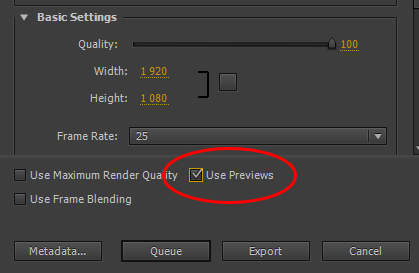
I was almost going to give up, but then came up with an idea to use Premiere’s internal render to transcode the footage by putting it on an XDCAM HD422 timeline, rendering it (Sequence -> Render Entire Work Area), and then exporting it with the switch that I almost never use – “Use previews“. I figured, that once the problematic footage is already converted, then the Media Encoder will handle the reconversion using previews without problems. I was happily surprised to have been proven correct. And because Premiere’s internal renderer was able to cope with the footage without a glitch, it all worked like a charm.

Use Previews switch

“Use Previews” can sometimes save not only rendering time, but also allow for encoding problematic files.

Afterwards the edit itself was relatively swift. I encountered another roadblock when I decided to explore DaVinci Resolve for color grading, and exported the project via XML. Resolve fortunately allows custom resolutions, so setting up a 640×480 project was not a problem. I also had to transcode the files again, this time to MXF container. This was a minor issue, and went relatively fast. However, due to the fact that some media was 480p, and some 1080p, and I have done quite a lot of resizing and rescaling of the latter, I wanted to use this information in Resolve. Unfortunately, Resolve did not want to cooperate. It’s handling of resize was very weird, and every time I clicked on the resized clip to grade it, it crashed. I’m certain that the scaling/panning was responsible, because when I imported the XML without this information, everything worked great. It might have something to do with the fact, that I was running it on an old GTX260, but still, I was not able to use the software for this gig.

In the end I graded the whole piece in Premiere Pro on its timeline. Here’s the whole thing for those of you who are interested:

BlackMagic Design denies rumors – or do they?

Peter Chamberlain from BlackMagic Design did deny any rumors (guess which ones?) that they are working on the cheaper control surface, believing that the segment is well saturated by other manufacturers. This is of course based on an assumption that the lowest segment is the price range that AVID, Tangent and JL Cooper are targetting, ie. around $1500-$2000. I must admit, that the release of Tangent Element, with the basic control surface at the cost of about $1200 is interesting, however it is still far above what I would consider the real democratization barrier – around $500-$700.

I understand all the limitations of such pricing, including the fact that this kind of surface would be looked by all proffessionals as a toy, which it would indeed be out of necessity of using cheap materials. I still believe it can be done, if R&D costs can be covered, and that it would introduce more people to color grading, than all the plugins combined.

It might of course be my wish to have at my disposal something that I’m currently not able to afford. But I also can’t help but to notice certain wording in Peter’s message. Namely:

…we have no plans for a cheaper panel at NAB. (emphasis added)

So… will anyone pick up the challenge? Or is my premise inherently flawed, and the future of color grading lies somewhere else?

Why slow motion seems majestic

There is much to be said about the memorability of slow motion footage in movies. While perhaps the most extreme recent example was the invention of “bullet time” in Matrix, and recently we have seen it taken to the extremes in Inception, the overcranking (shooting at higher framerate to later play it back at regular 24 fps) was the hallmark of cinematography ever since it was invented in 1904 by Austrian priest and physcist August Musger.

There is little doubt that slow motion footage for some reason does make the action seem more pronounced, more memorable, more impressive, and often more majestic.  Even though some cinematographers of note did tackle the reasons why slow motion has this certain effect, so far I have not found a convincing explanation in this field.

A possible insight into why slow motion might have this effect comes from the research on how people react under extreme stress: in combat, in sports, or in situations where one’s life is threatened. There exists a number of reactions that can happen to people in such situations. Alongside tunnel vision, selective deafness, there also is a perception of events occuring in slow motion. Most likely it is a result of the sudden flush of hormones like epinephrine, and the attempts of our brains to encode as much of what is happening as possible for future reference. Usually it is accompanied by the feeling of vividness, and awareness of being alive (this is also why such states of mind can become addictive, and life can seem pretty bland afterwards),  sometimes referred to as “hyper-reality”.

The important part is that the real slow motion effect in our brain is only an illusion, and the result of physiological processes of hastened memory creation. It does not grant the subject powers of Neo to dodge bullets, it only increases the awareness of occuring events. The reaction time remains as it is, even though the employed actions might be more efficient, than they would be in “normal time”.

However, it is highly probable, that our brain, when confronted with slow motion footage, takes it as a signal of something memorable happening, and tries to employ its standard procedure in such cases – trying to remember as much as it can, because it is an important, potentially life-threatening event. Due to the fact, that there is no hormonal rush, the effect is subsided, but it seems to have an impact nevertheless. How foolish of our brain to think so! And yet, we fall for the same trick again, and again. And slow-motion does work, even if used in excess.

Therefore, next time you see the slow motion footage employed to accentuate certain aspects of the action, or use this effect yourself, be aware that it works, because it references the state of mind that is already available to the viewer, and mimics what happens when our brains do firecely try to create a memorable event.

If readers are interested in further exploration of this topic, I suggest the book “On Combat” by Lt. Col. Dave Grossman, which has a great compilation of physiological effects that accompany events.